
Download HiddenArt – Generative AI Visual Art Creator, Free & Secure
Overview of HiddenArt.AI
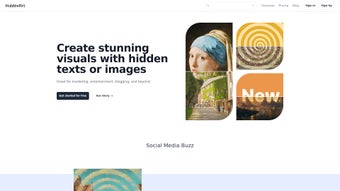
HiddenArt.AI is a cutting‑edge, web‑based generative AI platform that turns hidden texts or ordinary images into striking visual artworks. Built for marketers, bloggers, designers, and anyone who craves AI‑driven creativity, the service combines powerful diffusion models with an intuitive, drag‑and‑drop interface. Users can type a secret message, upload a photo, or select a community template, then watch the AI generate a high‑resolution image that reflects the hidden meaning or chosen style.
HiddenArt emphasizes security and privacy: all data is encrypted in transit, processed on cloud servers, and deleted after each session unless the user saves it to their account. The platform also respects copyright standards, granting commercial usage rights for generated content while providing built‑in checks to avoid unintentional infringement. Whether you need a banner for a new campaign, a unique illustration for a blog post, or an experimental art piece for personal exploration, HiddenArt delivers a seamless, secure, and free‑first experience that scales with professional needs.
Key Features that Differentiate HiddenArt
- Hidden Text‑to‑Image Engine: Convert concealed messages or code snippets into vivid, context‑aware artwork.
- Remix Studio: Upload any image and apply AI‑powered style transfers, palette swaps, or abstract reinterpretations.
- Real‑Time Preview & Editing: See instant results and fine‑tune prompts, resolution, and artistic style on the fly.
- Community Collaboration Hub: Share creations, receive feedback, join challenges, and learn from tutorials posted by fellow creators.
- Ethical AI Framework: Built‑in copyright validation and privacy controls ensure lawful and responsible usage.
- Cross‑Platform Web Access: Works on any modern browser, with mobile‑optimized layouts for Android and iOS devices.
- Export Flexibility: Download outputs as PNG, JPEG, SVG, or layered PSD for advanced post‑processing.
- Regular Model Updates & Free Tier: Monthly improvements, new style packs, and a generous allocation of free generation credits.
Each feature is designed to solve real‑world creative challenges. The hidden‑text engine, for instance, enables storytelling where the narrative is embedded directly in the visual output—perfect for cryptic marketing teasers or immersive art installations. Remix Studio goes beyond simple filters by preserving compositional integrity while applying sophisticated transformations, saving designers hours of manual work.
The community hub acts as a living knowledge base, offering step‑by‑step guides, style‑specific tutorials, and live streams that keep the learning curve shallow. All processing occurs on secure cloud servers, meaning even low‑spec devices can generate 4K‑ready images without lag. This blend of innovation, accessibility, and ethical safeguards makes HiddenArt a compelling choice for both hobbyists and professional creators.
Installation, Usage & Compatibility
Zero‑Download Setup – Getting Started in Minutes
HiddenArt is entirely web‑based, so there is no traditional installation. To begin, visit hiddenart.ai, register with an email or social account, and verify your address. After logging in, the dashboard presents three primary modes: “Hidden Text,” “Image Remix,” and “Community Templates.” Choose a mode, input your text or upload an image (max 10 MB), select a style from the library (e.g., Neon Futurism, Baroque Portrait, Abstract Geometry), and click “Generate.” Within seconds, a preview appears on the canvas. If the result needs refinement, sliders let you adjust contrast, saturation, detail level, or AI creativity (Low‑Medium‑High). Once satisfied, click “Export” to download in your preferred format or publish directly to the community feed.
Step‑by‑Step Usage Guide
- Sign Up & Verify: Create a free account and confirm your email to unlock the free credit pool.
- Select Creation Mode: Choose “Hidden Text,” “Image Remix,” or “Community Templates.”
- Provide Input: Type hidden text or upload an image; the platform accepts JPEG, PNG, and SVG.
- Pick a Style: Browse the curated style library, each with sample outputs and short descriptions.
- Adjust Settings: Set resolution (720p‑4K), color palette, and AI creativity level.
- Generate & Iterate: Click “Generate,” review the preview, and use “Regenerate” for variations.
- Export & Share: Download the final artwork or share it directly to the HiddenArt community.
Device Compatibility
HiddenArt runs on any modern browser that supports WebGL and ES6 JavaScript, making it compatible with Windows 10/11, macOS Monterey or later, major Linux distributions, Android 8+ and iOS 13+. The platform auto‑detects your device and delivers an optimized UI: desktop users get a full‑screen canvas with drag‑and‑drop uploads, while mobile users enjoy a touch‑friendly layout and cloud‑based rendering that conserves battery life. Because all heavy AI computation occurs on HiddenArt’s servers, even low‑end laptops or smartphones can produce high‑resolution artwork without performance degradation. Accessibility features such as keyboard navigation, high‑contrast themes, and screen‑reader labels ensure an inclusive experience for creators of all abilities.
Pros, Cons & Frequently Asked Questions
Balanced Evaluation
- Generous free tier with monthly credits for hobbyists.
- No installation required; works on any device with a modern browser.
- Innovative hidden‑text engine unlocks new storytelling possibilities.
- Powerful Remix Studio maintains image composition while applying creative transformations.
- Active community hub provides tutorials, feedback, and collaborative challenges.
- Secure cloud processing with built‑in copyright and privacy safeguards.
- Regular AI model updates keep the tool state‑of‑the‑art.
- Export options include layered PSD for professional workflows.
- Requires a stable internet connection; offline work is not possible.
- Free tier limits daily generation credits; power users may need a paid plan.
- Complex prompts sometimes need trial‑and‑error to achieve the desired output.
- Advanced style packs are locked behind premium subscriptions.
- High‑resolution (4K) renders can be slower on weak network connections.
Frequently Asked Questions (FAQ)
Is HiddenArt completely free to use?
HiddenArt offers a generous free tier that provides a set number of generation credits each month, allowing casual users to experiment without paying. Professionals who need higher volume or premium style packs can upgrade to a subscription plan.
Do I need a powerful computer to generate high‑resolution art?
No. All intensive AI processing happens on HiddenArt’s cloud servers. Your device only needs a modern browser and a stable internet connection, making 4K generation possible even on low‑end laptops or smartphones.
Can I use the generated images for commercial purposes?
Yes. HiddenArt’s terms of service grant commercial usage rights for images created under both the free and paid plans, provided you adhere to the platform’s copyright and ethical guidelines.
How does the hidden‑text‑to‑image feature work?
The engine parses the supplied text, extracts semantic cues, and feeds them into a generative diffusion model trained on millions of visual concepts. The AI then constructs an image that reflects the hidden meaning while following the selected artistic style.
Is my data safe when I upload images for remixing?
HiddenArt follows strict privacy policies: uploaded files are encrypted in transit, processed on secure servers, and automatically deleted after the session unless you choose to save them to your account.
Conclusion & Call to Action
HiddenArt.AI stands out as a secure, free‑first generative AI platform that democratizes high‑quality visual creation. Its unique hidden‑text engine, powerful Remix Studio, and vibrant community hub make it more than a simple tool—it’s an ecosystem for modern creators. Whether you are a marketer seeking eye‑catching campaign assets, a blogger needing unique illustrations, or an artist exploring AI‑driven expression, HiddenArt provides the features, flexibility, and ethical safeguards you need.
The free tier lowers the entry barrier, while subscription options scale with professional demands. Ready to unleash your imagination and generate art that truly surprises and inspires? Download HiddenArt now and start creating instantly—no installation required.
Pros: Generous free tier, cloud‑based speed, innovative hidden‑text engine, strong community, ethical AI safeguards.
Cons: Requires internet connection, premium features locked behind subscription.



.png)



